
The Foundation of Successful Data Analysis in Power BI
Data is the backbone of modern businesses, providing valuable insights that support decision-making. However, raw data alone is often not usable. This is where the ETL process comes into play—a crucial component of data processing and analysis. In this blog, I will explain what ETL is and how this process is implemented in Power BI, one of the leading Business Intelligence tools, with examples that illustrate each step.
What is ETL?
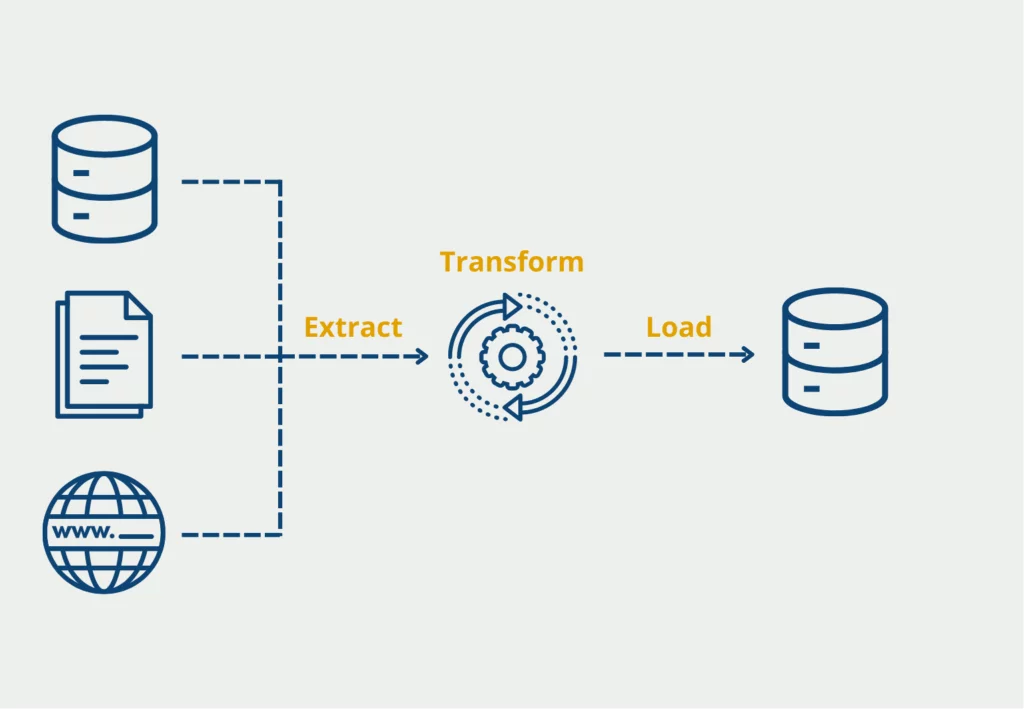
ETL stands for Extract, Transform, Load. It is a three-stage process that consolidates data from various sources into an analyzable format:
- Extract: In this phase, data is collected from different sources. For example, a company may have sales data in an SQL database, customer data in an Excel file, and market analysis in an online tool like Google Analytics. The extraction process retrieves this data from each source.
- Transform: The raw data is then converted into a usable format. For instance, the extracted sales data might be stored in different currencies. During the transformation, all amounts are converted into a single currency, invalid records are removed, and new columns, such as “Total Sales per Customer,” are calculated.
- Load: The transformed data is loaded into a target system where it is ready for analysis. For example, the cleaned and consolidated data is loaded into the Power BI data model, where it can be used to create reports and dashboards.
The ETL Process in Power BI
Power BI offers an integrated environment that seamlessly covers the entire ETL process. Here’s an overview of how each step is implemented in Power BI:
- Data Extraction in Power BI: Power BI allows connections to a wide variety of data sources. For example, imagine you want to retrieve data from a SQL Server database and an Excel spreadsheet. Through the “Get Data” dialog, you select the SQL database to extract the sales data and add the Excel spreadsheet containing customer data. Power BI uses the Power Query Editor to connect and load these data sources.
- Data Transformation in Power BI: The Power Query Editor in Power BI is a powerful tool for transforming data. For instance, after extracting the sales and customer data, you might find that the date format in the Excel spreadsheet does not match the SQL database. In the Power Query Editor, you can adjust the date format, remove unnecessary columns, and fill in missing data with average values. You can also convert currencies and add a new column for the total sales per customer.
- Data Loading in Power BI: After the transformation, the data can be directly loaded into Power BI. For example, the transformed sales and customer data is now loaded into the Power BI data model. Here, you define relationships between tables to ensure that sales figures are correctly linked with the corresponding customer information. This data is now ready for creating interactive dashboards that display sales by region, time period, or customer segment.
Benefits of ETL in Power BI
Implementing the ETL process in Power BI offers numerous benefits:
- Seamless Integration: For example, instead of using multiple tools for SQL database queries, Excel data preparation, and reporting, you can do everything directly in Power BI. This saves time and reduces the error rate.
- Flexibility: Whether you need data from an SQL database, a web API, or a simple CSV file, Power BI supports all these formats and allows you to integrate all these data sources simultaneously.
- Automation: Once set up, ETL processes in Power BI can be automated, ensuring that data is updated daily or weekly. For instance, you can ensure that sales reports are always based on the latest data.
- Scalability: As your business grows and data volumes increase, Power BI can easily scale. It can handle large datasets while providing the performance and speed required for extensive analysis.
Conclusion
A well-designed ETL process is crucial to the success of any data-driven initiative. With Power BI, you have a powerful tool at your disposal that efficiently and flexibly supports the ETL process. Whether you want to merge, transform, or visualize data in compelling dashboards, Power BI provides all the necessary features to elevate your data analysis to the next level.
As an expert in Power BI and ETL processes, I am here to help you develop tailored solutions for your business. Let’s work together to turn your data into valuable insights!